Social Login
Social Login can be configured at https://SERVER_ADDRESS/admin/social/socialprovider/ ⧉
- Navigate to https://SERVER_ADDRESS/admin/social/socialprovider/add/ ⧉
- Select one of the supported provider and add related configuration as a JSON object in the Configuration field.
- Be sure
enabledis checked before saving the form.
The configuration uses the Python Social Auth ⧉ settings.
In Bitcaster, these settings must be provided as a JSON dictionary where keys are the setting names
(e.g., SOCIAL_AUTH_GITHUB_KEY).
Supported backends
Azure AD
To use Azure AD, you need to register an application in the Azure Portal.
{
  "SOCIAL_AUTH_AZUREAD_OAUTH2_KEY": "<your-client-id>",
  "SOCIAL_AUTH_AZUREAD_OAUTH2_SECRET": "<your-client-secret>"
}
Tenant support
If you want to restrict login to a specific tenant:
{
  "SOCIAL_AUTH_AZUREAD_TENANT_OAUTH2_KEY": "<your-client-id>",
  "SOCIAL_AUTH_AZUREAD_TENANT_OAUTH2_SECRET": "<your-client-secret>",
  "SOCIAL_AUTH_AZUREAD_TENANT_OAUTH2_TENANT_ID": "<your-tenant-id>"
}
Further reading: Azure AD Auth ⧉
Requires a Facebook App.
{
  "SOCIAL_AUTH_FACEBOOK_KEY": "<your-app-id>",
  "SOCIAL_AUTH_FACEBOOK_SECRET": "<your-app-secret>",
  "SOCIAL_AUTH_FACEBOOK_SCOPE": ["email"]
}
Further reading: Facebook Auth ⧉
GitLab
Requires a GitLab Application.
{
  "SOCIAL_AUTH_GITLAB_KEY": "<your-application-id>",
  "SOCIAL_AUTH_GITLAB_SECRET": "<your-secret>",
  "SOCIAL_AUTH_GITLAB_API_URL": "https://gitlab.com"
}
Further reading: GitLab Auth ⧉
GitHub
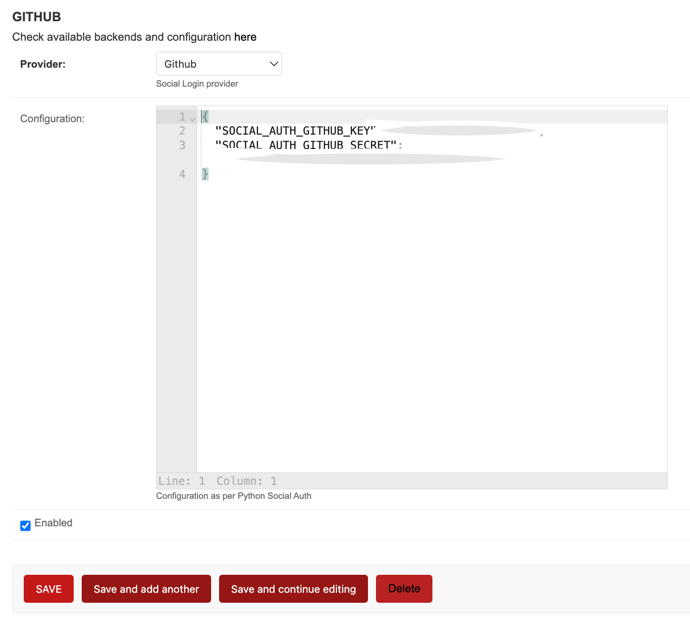
Requires a GitHub OAuth App.
{
  "SOCIAL_AUTH_GITHUB_KEY": "<your-client-id>",
  "SOCIAL_AUTH_GITHUB_SECRET": "<your-client-secret>",
  "SOCIAL_AUTH_GITHUB_SCOPE": ["user:email"]
}
GitHub Enterprise
{
  "SOCIAL_AUTH_GITHUB_ENTERPRISE_KEY": "<your-client-id>",
  "SOCIAL_AUTH_GITHUB_ENTERPRISE_SECRET": "<your-client-secret>",
  "SOCIAL_AUTH_GITHUB_ENTERPRISE_URL": "https://github.example.com",
  "SOCIAL_AUTH_GITHUB_ENTERPRISE_API_URL": "https://github.example.com/api/v3"
}
GitHub Organizations
Restricts login to members of specific organizations.
{
  "SOCIAL_AUTH_GITHUB_ORG_KEY": "<your-client-id>",
  "SOCIAL_AUTH_GITHUB_ORG_SECRET": "<your-client-secret>",
  "SOCIAL_AUTH_GITHUB_ORG_NAME": "<your-org-name>"
}
GitHub Team
Restricts login to members of a specific team.
{
  "SOCIAL_AUTH_GITHUB_TEAM_KEY": "<your-client-id>",
  "SOCIAL_AUTH_GITHUB_TEAM_SECRET": "<your-client-secret>",
  "SOCIAL_AUTH_GITHUB_TEAM_ID": "<your-team-id>"
}
Further reading: GitHub Auth ⧉
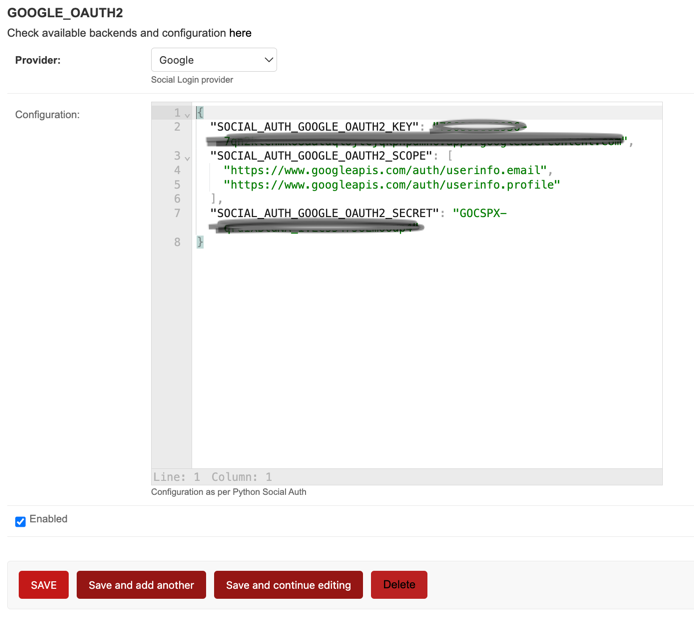
Requires a Google Cloud Project with OAuth 2.0 Client ID.
{
  "SOCIAL_AUTH_GOOGLE_OAUTH2_KEY": "<your-client-id>",
  "SOCIAL_AUTH_GOOGLE_OAUTH2_SECRET": "<your-client-secret>"
}
Sample Configuration:
Further reading: Google Auth ⧉
{
  "SOCIAL_AUTH_LINKEDIN_OAUTH2_KEY": "<your-client-id>",
  "SOCIAL_AUTH_LINKEDIN_OAUTH2_SECRET": "<your-client-secret>",
  "SOCIAL_AUTH_LINKEDIN_OAUTH2_SCOPE": ["r_liteprofile", "r_emailaddress"]
}
Further reading: LinkedIn Auth ⧉
Keycloak
{
  "SOCIAL_AUTH_KEYCLOAK_KEY": "<your-client-id>",
  "SOCIAL_AUTH_KEYCLOAK_SECRET": "<your-client-secret>",
  "SOCIAL_AUTH_KEYCLOAK_PUBLIC_KEY": "<your-public-key>",
  "SOCIAL_AUTH_KEYCLOAK_AUTHORIZATION_URL": "https://<key-url>/auth/realms/<realm>/protocol/openid-connect/auth",
  "SOCIAL_AUTH_KEYCLOAK_ACCESS_TOKEN_URL": "https://<key-url>/auth/realms/<realm>/protocol/openid-connect/token"
}
Further reading: Keycloak Auth ⧉
WSO2
Uses a specialized backend that requires OpenID Connect configuration.
{
  "SOCIAL_AUTH_OAUTH2_KEY": "<your-client-id>",
  "SOCIAL_AUTH_OAUTH2_SECRET": "<your-client-secret>",
  "SOCIAL_AUTH_OAUTH2_AUTHORIZATION_URL": "https://<wso2-url>/oauth2/authorize",
  "SOCIAL_AUTH_OAUTH2_ACCESS_TOKEN_URL": "https://<wso2-url>/oauth2/token",
  "SOCIAL_AUTH_OAUTH2_USERINFO_URL": "https://<wso2-url>/oauth2/userinfo"
}
Further reading: WSO2 Auth ⧉
Requires a Twitter Developer App.
{
  "SOCIAL_AUTH_TWITTER_KEY": "<your-consumer-key>",
  "SOCIAL_AUTH_TWITTER_SECRET": "<your-consumer-secret>"
}
Further reading: Twitter Auth ⧉
Generic OAuth
Can be used for any OAuth2 compatible provider.
{
  "SOCIAL_AUTH_OAUTH2_KEY": "<your-client-id>",
  "SOCIAL_AUTH_OAUTH2_SECRET": "<your-client-secret>",
  "SOCIAL_AUTH_OAUTH2_AUTHORIZATION_URL": "https://example.com/authorize",
  "SOCIAL_AUTH_OAUTH2_ACCESS_TOKEN_URL": "https://example.com/token"
}
Further reading: Generic OAuth2 ⧉
Global configuration
Some global parameters for Social Auth can be configured in the Bitcaster Admin interface at https://SERVER_ADDRESS/admin/constance/config/ ⧉
| Parameter | Default | Description |
|---|---|---|
SOCIAL_AUTH_CREATE_USER |
True |
If true, not existing users will be automatically created. If false, only already existing users can log in via SSO. |
SOCIAL_AUTH_ACCEPTED_USERS |
'' |
A comma separated list of emails that are allowed to log in. It supports regular expressions (e.g., .*@example.com). |
NEW_USER_DEFAULT_GROUP |
DEFAULT_GROUP_NAME |
The Django Group that will be assigned to any new user created via SSO. |
NEW_USER_IS_STAFF |
False |
If true, any new user created (via SSO or otherwise) will be marked as staff. |